BeautifulSoup4(2) (GAE)
目次
前回作成したスクリプトを、Google App Engine で実行してみました。
GAEの準備
こちらのQuickStartにしたがってHello worldが表示されるところまで進めます。 (Cloud Shellを使用)
ソースコード編集
オンラインエディタで main.py と requirements.txt に追記します。
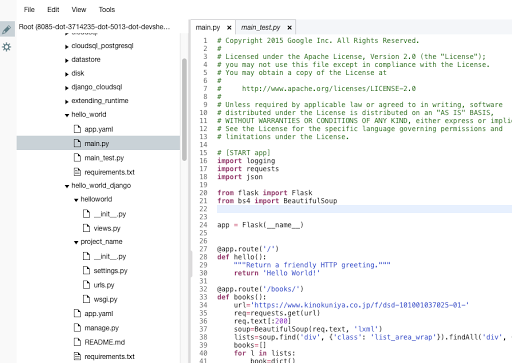
オンラインエディタはこのような画面です。
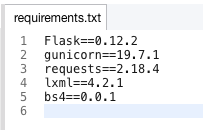
requirements.txt に requests、lxml、bs4 を追加します。
必要な import と、/books/ にアクセスしたときの処理を追加します。
# Copyright 2015 Google Inc. All Rights Reserved.
#
# Licensed under the Apache License, Version 2.0 (the "License");
# you may not use this file except in compliance with the License.
# You may obtain a copy of the License at
#
#     http://www.apache.org/licenses/LICENSE-2.0
#
# Unless required by applicable law or agreed to in writing, software
# distributed under the License is distributed on an "AS IS" BASIS,
# WITHOUT WARRANTIES OR CONDITIONS OF ANY KIND, either express or implied.
# See the License for the specific language governing permissions and
# limitations under the License.

# [START app]
import logging
import requests
import json

from flask import Flask
from bs4 import BeautifulSoup

app = Flask(__name__)

@app.route('/')
def hello():
    """Return a friendly HTTP greeting."""
    return 'Hello World!'

@app.route('/books/')
def books():
    url='https://www.kinokuniya.co.jp/f/dsd-101001037025-01-'
    req=requests.get(url)
    req.text[:200]
    soup=BeautifulSoup(req.text, 'lxml')
    lists=soup.find('div', {'class': 'list_area_wrap'}).findAll('div', {'class': 'list_area'})
    books=[]
    for l in lists:
        book=dict()
        book['name']=l.find('h3').find('a').text.strip()
        book['author']=l.find('p', {'class': 'clearfix'}).text.strip()
        book['price']=l.find('span', {'class': 'sale_price'}).text.strip()
        books.append(book)
    return json.dumps(books)

@app.errorhandler(500)
def server_error(e):
    logging.exception('An error occurred during a request.')
    return """
    An internal error occurred: <pre>{}</pre>
    See logs for full stacktrace.
    """.format(e), 500


if __name__ == '__main__':
    # This is used when running locally. Gunicorn is used to run the
    # application on Google App Engine. See entrypoint in app.yaml.
    app.run(host='127.0.0.1', port=8080, debug=True)
# [END app]
今回は表示を整えず、JSON 形式で出力しています。
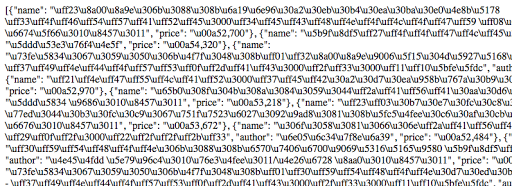
ブラウザでは、このように表示されました。
次は定期実行してメールで送るか、表示用のフロントエンドを作るか、検討しています。
share